




You have a job to do tomorrow. How much will it cost? If you’re just estimating loosely based on your previous jobs, you’re probably missing out on a lot of revenue.
In construction, regardless of whether you are a general contractor or a specialty contractor, tracking job costs and finding ways of reducing costs are critical to profitability. Frequently, the market sets the price on your bid—and you need to be able to match your competitors. So the path to increased profitability better managing your costs and reducing them over time.
Construction job costing will help you also improve the accuracy of your future bids, while also giving you more control and awareness of your expenses — and it’s one of the most effective levers available to anyone serious about construction expense management across their entire project portfolio.
What Is Job Costing for Construction?
Job costing is a method of tracking, assigning, and estimating costs on a project-by-project basis traditionally including labor, material, equipment, and other overhead costs.
Job costing is the alternative to process costing. Under process costing, you would provide an approximate estimate of how much something might cost you based on prior knowledge. You know that one job costs you $1,600, so doing a job half the size might cost you $800.
But when it comes to construction jobs, your labor, material, and equipment can break down in different ways. What if $1,000 of that cost was in a single piece of equipment that you’ll need either way? If that’s true, you will lose money on any job under $1,000.
Why You Need Job Costing
Job costing is important because it tracks the costs of each job in great detail. There are many costs throughout a project that could slip through the cracks and not be counted. They could cost business owners significant amounts of money.
Knowing what your projects are costing has several direct impacts on your profitability:
- Seeing your project costs in real-time can help you compare costs and cut spending going forward.
- It can also be helpful in improving client billing and collecting more of the reimbursements your company has earned. At a broader level, job costing is one of the most powerful inputs into construction expense management — it converts raw project activity into the financial visibility that keeps a business profitable across its entire portfolio.
- Knowing project costs will help you get better at future estimates by comparing your budget to the actual cost of what you are spending.
How to Calculate Job Costs
Several things factor into the formula for calculating your job costs— direct labor, materials, and overhead (which many people forget to include). That means you will need to calculate the total job cost and all related expenses including direct and indirect costs.
To make it easy, you can use this equation for job costing any project:
Total Cost = The Cost of Direct Labor + Direct Materials + Overhead
1. Calculate Direct Labor Costs
Employees
Determine how much it will cost each day (or by the hour) to have each of your employees on the job. You can estimate these projections on paper. To get the most accurate results, use construction time tracking software to collect accurate hours from all of your employees.
Even better if you’re using software that breaks down the hours by tasks they perform each day on individual jobs. You can then use that historical data on all similar projects in the future.
Multiply the rate determined above by the length of time the job or specific task will take to complete. Don’t forget to include all subcontractor estimates and any contingencies to cover unexpected expenses that will arise. This will give you your labor costs. Strong subcontractor management helps keep those estimates aligned with scope, progress, and actual costs throughout the project.
Employee Costs Defined
- Wages – These are the wages paid to your employees. Be sure to include all annual payroll taxes and annual overhead in this figure. This will help you determine how much an employee costs you each hour.
- Direct Labor Hours – This is the number of hours an employee will need to produce one unit of product or service. Don’t forget to include shift differentials and any overtime the employee worked.
- Direct Labor Costs – The difference between direct labor hours and direct labor costs is subtle. Labor hours refers to the actual work an employee performs to produce a product or service. Labor costs refer to how much money the employer must pay the employee to perform a task.
- Indirect Labor Hours – This is the cost of employees not involved in the planning or construction of a project. These are the employees involved in the day-to-day running of your business. For example, managers, foremen, human resources, accountants, customer service representatives, or other office personnel.
- Dollar Amount – This is the total dollar amount you spend on labor. This includes the pay for salaried and hourly workers. It includes taxes and employee benefits.
- Payroll Taxes – This is a percentage deducted from an employee’s pay that goes to the government.
- Salary – This is a form of employee payment according to a specified employment contract. It’s a fixed regular bi-weekly or monthly amount. This is different from piece wages where every job, hour, or other type of unit that is paid separately, rather than being paid periodically.
2. Calculate Material Costs
To get your total costs it’s also important to track the cost of goods that are used and scrapped during a project. This includes direct materials like wood, wiring, steel, and indirect materials such as caulking, fasteners, cleaning supplies, and miscellaneous tools.
You also must include the cost of any equipment rentals, delivery charges, and waste. That means you need to accurately track the material costs mentioned above for every aspect of every job this also helps you to build a construction profitability analysis report.
For example, let’s say you have to run rocker switches throughout a home remodel.
- If the project calls for 30 switches installed it would require $2.99 for each switch.
- $2.21 for each decorative wall plate.
- $1.98 for each PVC electrical box.
- We’ve intentionally left out the wiring required to each box.
- Therefore, the total direct material cost would be $215.40.
3. Determining Overhead Costs
Now you will have to determine all your overhead costs to reach your total job cost. Overhead includes things like equipment depreciation, facility rent, office administration, and expenses. These costs aren’t directly related to any given job, so this will be an approximation rather than a calculation. In other words, overhead costs are all the indirect costs that go into a project.
Many believe that adding 10% as an overhead to each job is a standard. However, some general contractors report overheads of as high as 54% of revenue. Your accountant would be the best person to help you figure out the right overhead to use for your business.
Alternatively, you could calculate and use a predetermined overhead rate.
What Is Predetermined Overhead Rate?
Tracking your overhead costs is extremely difficult; therefore, you might consider using a predetermined overhead rate when job costing. A predetermined overhead allocation rate is a calculation that’s used to determine the estimated overhead costs for individual projects over a specified period of time.
Most business owners have an annual budget that includes estimated overhead costs and estimated activity for any given year. You can use your budget estimate to calculate your overhead rate and apply it to each job.
Here is an equation to help you calculate a predetermined overhead rate.
Predetermined Overhead Rate = the Estimated Overhead Costs / Estimated Activity
For example, let’s say you estimate that this year you will have $500,000 in overhead costs. Then you estimate your employees will work about 10,000 hours.
Your calculation would read:
500,000 overhead costs / 10,000 direct labor hours = $5 per direct labor hour.
So basically, this is your predetermined overhead rate, and you would apply that rate to each direct labor hour worked.
A Small Business Job Costing Example
Acme Contracting
Acme Contracting just completed a job. The direct labor cost for that job was $20,000. The material costs were $2,500. The overhead costs were $8,500.
These are all the figures you need to calculate your job costing.
Equation
Direct materials $2,500 + Direct Labor $20,000 + Added Overhead $8,500 = $31,000
The total job cost for this construction project is $31,000.
So, that is the end result, but how do you get there? You can use a spreadsheet for your job costing and calculate everything manually. The hardest part is actually collecting all of the data and ensuring everything is accounted for. If you want to streamline the process and make it easier and more accurate, you use job costing software to save yourself a whole lot of time and headaches (we’ll cover that next).
Related in WorkyardCatch budget overruns as they happen with WorkyardLabor costs captured automatically, for instant cost insight that helps prevent overruns.Construction Job Costing: Estimating Your Expenses
Job costing for construction breaks everything down into granular expense items. How you estimate those expenses matters. Often, an owner is doing everything right when it comes to their job costing—but their initial numbers are so far off that it doesn’t matter.
Labor
Construction companies can lose thousands of dollars to inaccurate labor estimates on every job. Employees enter their time incorrectly, mistakes occur during the payroll process, and scheduling issues lead to unnecessary overtime. For ways to act on those labor overruns, explore how to reduce construction labor costs without cutting crew.
Construction company owners don’t have the time to micromanage their employees. If you aren’t on-site, you don’t know when your employees are actually arriving, when they leave, or when they’re taking breaks.
But Workyard can help.
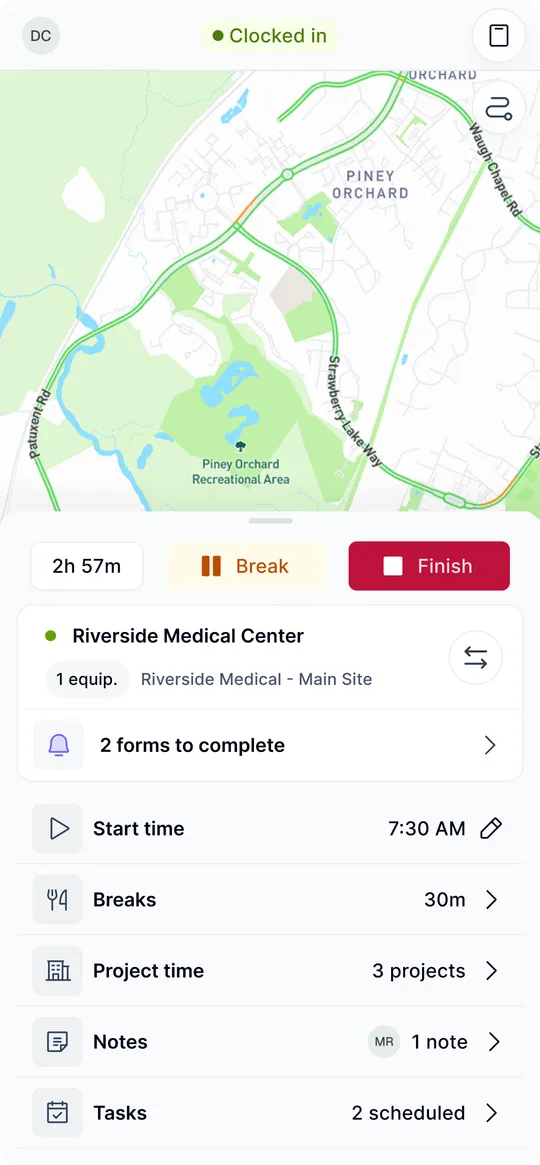
With Workyard’s construction timesheet software, employee time is accurately tracked for each job site; additionally, employees can also tag hours to construction cost codes as part of their daily clock in and out process. For a full comparison of labor tracking software options, see our roundup.
Accurately capturing your labor costs for each job and being able to see how those costs are tracked in real-time helps you steer each project in the right direction to avoid overruns and improve your future bids.
If your crew isn’t coding their time consistently, you’ll end up with hours arriving at payroll that can’t be tied to any job or task. Learn how to stop hours arriving at payroll without construction cost codes – a common problem that quietly inflates labor costs and makes job costing far less reliable.
“Workyard is going to save me $2,500 in inflated payroll costs from one guy alone. Guys would round to a 7 am arrival time. Now I can see 7:18, 7:14 actual arrival times on site.”
Materials
In addition to labor, material costs can get out of control quickly. It’s not always easy to anticipate which materials will rise in cost, either. As supply chain issues become more common, contractors need to take action to reduce their uncertainty. This extends to job costing.
To make your job costing for construction more accurate:
- Cost out materials on a per-project basis rather than taking material costs estimates from previous projects.
- Insert wiggle room into project quotes, estimating a 10% to 20% material cost buffer depending on the market. Inserting these buffers into your estimates is much easier when you’re working from a structured construction budget that already accounts for contingencies by category — it gives you a clear baseline to compare actuals against as the project progresses.
- Create contingencies early, such as alternative materials that can be sourced if the primary materials are too expensive.
Material costs can be volatile. But with proper construction planning and scheduling, they won’t break a project. Stay ahead of the game by keeping a comprehensive list of your vendors and frequently running material price comparisons.
Equipment Costs
Out of all job costs, equipment is probably the most straightforward. But there are still some ways a construction company can save money when calculating their equipment costs:
- Assess whether you can save money by leasing equipment rather than purchasing it or vice versa.
- Invest in equipment when it might improve the productivity of your workforce; an expensive piece of equipment may still be less than your cost of overtime.
- Ensure that your equipment is well-maintained and periodically inspected to avoid costly last-minute repairs.
Having the right tools and equipment matters—and so does maintenance. It’s all about running a tight ship even when you aren’t there. For a practical method of assigning ownership, rental, fuel, and operating costs to the right project, read our guide to equipment job costing. Our equipment hourly cost rate guide explains how to combine ownership, operating, and productive-hour assumptions into a defensible internal rate.
For choosing the right mix of telematics and job-linked documentation, check out our comparison of GPS tracking for construction equipment.
Soft Costs
Construction hard costs are easier to focus on because they’re the ones that are the most obvious and directly associated with a project. By contrast, construction soft costs are more “passive” costs. For example:
- Inspection fees.
- Permits and surveys
- Architectural fees
- Bank fees
- Legal Fees
- etc.
The more soft costs you can directly associate with specific projects when job costing the better.
Having the right tools and equipment matters—and so does maintenance. It’s all about running a tight ship even when you aren’t there.
Job costing for construction is less about the process and more about having the right numbers. The more information you have available, the faster and easier the job costing process will be. Workyard can help.
The Benefits of Using Job Costing Software
Job costing software streamlines your job costing process in the following ways:
- Job costs such as direct labor costs and materials are automatically captured and categorized for you. Your team uses the software to record their time, materials used and it takes care of the rest. Recording time can be as simple of as a couple of taps on a phone every day.
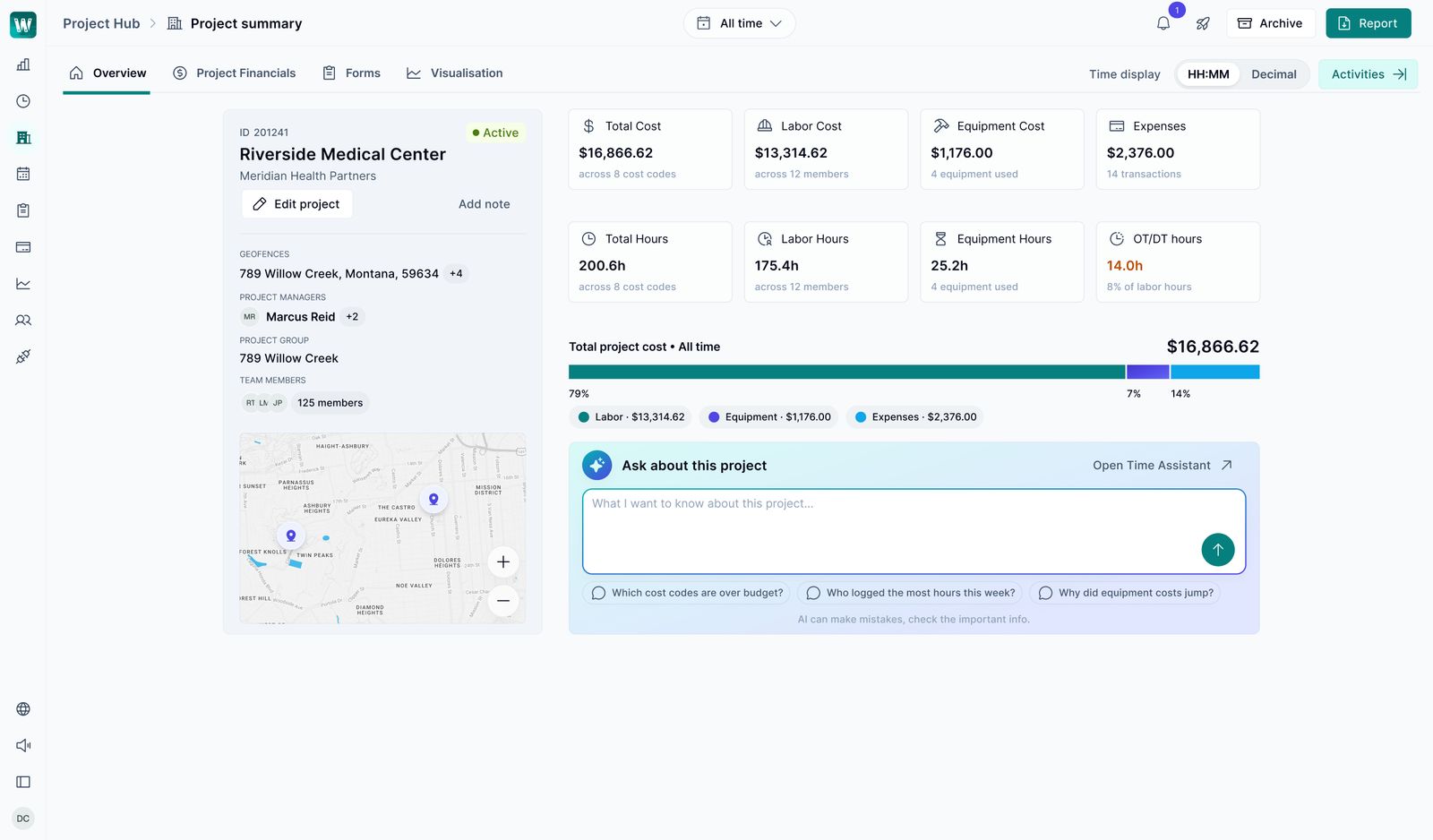
- Dashboards and reports give you a live view of how your job costs are tracking so you can make better decisions to come in on budget.
- Detailed job cost reporting enables you to drill in and understand specific components of your jobs that were either over or under budget. For construction finance and accounting teams managing multiple projects simultaneously, that level of reporting is what turns job costing from a back-office exercise into an active tool for protecting margins.
Tips and Best Practices for Construction Job Costing
KPMG’s Global Construction Survey in 2015 discovered that only 31% of projects came within 10% of their budget. Job costing is difficult, even when you do everything right.
How can you make sure that your construction job costing is as accurate as possible?
- Use a GPS Time Tracking App Your payroll is your biggest expense. It has to be accurate. A GPS construction time clock app ensures that you’re only paying for hours actually worked—and that the hours worked are appropriately attributed by job so you know exactly where the money is going.
Workyard’s GPS time tracking software provides an easy way to accurately capture time for each job. - Break Down Your Estimates & Use Cost Codes To Track Costs Accurately Breaking down your estimates not only helps you bid more accurately but also helps you pinpoint exactly which parts of a job you are underestimating or overestimating. Cost codes are a useful way to ‘bucket’ expenses for each piece of a job. Allocating time to specific cost codes can be cumbersome, but using a time tracking app designed for contractors will make this easier for your crew.
Workyard makes it easy for your crew to tag time to each cost code you have set up. - Accurately Calculate Your Labor Burden When Estimating Your labor burden provides an estimate of overhead associated with payroll. If you don’t calculate your labor burden, your labor costs won’t be complete—you’ll be spending significantly more than you think in overhead. Learn how to calculate your labor burden more effectively.
- Track Job Costs While The Project Is Executing Too many contractors wait until a project is finished to figure out whether they made money and to identify where exactly the overruns happened. Use real-time job costing software to have a live view of how your costs are tracking so you can steer your projects in the right direction. Get a live view of your job costs with Workyard’s job costing software.
- Monitor Your Client Billings Reimbursable costs must be reimbursed, otherwise, your company is losing money. But often client billings aren’t accurate because the costs aren’t being captured or correctly attributed. Workyard makes it possible to assign payroll and other expenses directly to projects, increasing client reimbursements.
Workyard can increase client reimbursements by up to 30%. - Leverage Job Cost Reports From Previous Jobs To Improve Future Bids Workyard provides labor cost reports for past projects broken down by employee and code.
Enhancing Job Costing for Small Construction Businesses
Job costing plays a critical role in managing your construction projects efficiently. Here are some valuable resources and strategies to enhance your job costing process and improve overall project profitability:
- Integrating Job Costing with QuickBooks Online
For a more streamlined accounting process, learn how job costing in QuickBooks Online can enhance your cost tracking and provide better financial insights, especially when managing multiple construction projects. - Using Construction-Specific Management Tools
Incorporating the right tools for tracking project costs can significantly improve your cost efficiency. Check out essential construction management tools that can help you better manage expenses, resources, and timelines on your job sites. - Automating Payroll for Cost Efficiency
A major component of job costing is accurate labor tracking. Implementing payroll automation can save time, minimize errors, and ensure that your job costing reflects real labor costs. - Utilizing Time Tracking Apps for QuickBooks Integration
Time tracking is crucial for accurate job costing. Consider integrating a time tracking app for QuickBooks to ensure labor hours are correctly attributed to each project, making job costing more precise and simplifying payroll processes. - Avoiding Common Time Tracking Errors
Accurate time tracking is key to correct job costing. Learn how to avoid time tracking errors that could lead to inaccuracies in labor costs and budgeting for your construction projects. If you’re exploring tools, check out our review of Clockify to understand its capabilities and limitations for time tracking. - Job Costing Essentials for QuickBooks Users
Understanding the fundamentals of QuickBooks can be a game-changer for construction businesses. Learn more about QuickBooks essentials for managing job costs effectively and improving your financial management practices. - Tracking Construction Costs with Construction Cost Codes
For detailed cost tracking, construction cost codes can provide an organized way to manage expenses across different areas of your projects. Implementing these codes in your job costing process will help maintain accurate cost records and enhance project profitability.
By integrating these practices and tools into your job costing process, you can gain greater control over your project costs, enhance your profitability, and streamline your financial management.
What To Look for in a Construction Job Cost Report
Accurate job costing for construction requires a strong foundation. With the right data, your company will be able to calculate job costs with greater levels of accuracy.
Workyard offers a job cost report that gives you the most accurate breakdown of your project labor costs. For construction finance and accounting teams who need to reconcile field actuals against project budgets, having that data update automatically with every new timecard submission removes a significant amount of manual work from the close-out process.
“I like that I can instantly run a report in Workyard to show me how we’re doing across any of the 5 projects we’ve got running at the same time.”
Streamlining Your Job Costing with QuickBooks and Workyard
For construction professionals looking to improve the accuracy of their job costing, Workyard’s QuickBooks integration is a practical way to allocate labor expenses correctly and maintain control over project budgets The software can be integrated with Employee Time Tracking solutions, like Workyard, to easily log hours worked and ensure that every expense is properly tracked.
Accurately capturing your costs is fundamental for understanding your job profitability. With Job Tracking in place, construction companies can see a real-time overview of how expenses are shaping up throughout the life of the project. Workyard makes this process seamless by providing precise job-level data, which can then be directly synced with your QuickBooks account.
If you want to maximize the value of your Construction Time Tracking efforts, you should also integrate your time data with your payroll system. Workyard’s Payroll Integration allows you to push hours tracked and labor costs to your payroll provider, streamlining your payroll process and ensuring accuracy.
For those using a Time Clock App, it’s important to have one that ties together location-based tracking with job costing. By tracking GPS data, you can ensure that the hours worked are correctly tagged to each project, and that travel between job sites is accounted for.
Beyond labor, your equipment and material costs also need to be closely monitored. Workyard makes it easy to see a breakdown of labor hours and related costs for each Job Cost Report. Detailed job costing reports give you the necessary insights to manage your projects more effectively and bid more accurately for future jobs.
For real-time updates, you should consider using Time Tracking Integrations that link directly with your accounting software. These integrations allow you to see a live feed of how your costs are tracking and ensure all your data is up-to-date without manual entry.
Contractors using Acumatica can achieve the same field-to-accounting handoff with the Workyard x Acumatica integration.
Finally, when managing all your projects and employee hours, a comprehensive Employee Time Clock solution like Workyard gives you an edge. It enables you to easily assign hours to the correct projects and cost codes, ensuring that your job costing is precise and your profitability is protected.
By using these tools in conjunction with each other, you can have a better understanding of your costs, streamline your processes, and ensure that you’re bidding accurately on each construction project.
Landscaping jobs carry their own costing challenges, from crew hours spread across multiple properties to materials that shift with every season. See how the best landscaping job costing software handles it so nothing slips through the cracks.
How To Get Started With Job Costing
To get started with your job costing today, sign up for a free trial of Workyard.
Workyard will help you narrow down your payroll expenses to the minute, reduce your overtime, and track labor costs accurately for each of your projects.
Workyard makes it easy to capture job costs and improve profitability by:
- Correctly assigning time to each project by detecting precise arrival and departure times
- Enabling your crew to easily tag hours to specific cost codes
- Automatically capturing and assigning mileage and driving time to the relevant project
- Seeing project and labor costs in real-time
- Providing construction profitability analysis and a historical data set you can reference for future project bids
Not only will you have the historical data that you need to produce accurate job cost reports but also the real-time access you need to control expenses once on the job.